
Deploy Pipeline
Clicking Deploy in the AwaitStep UI starts a multi-stage pipeline. Each stage is reported in real time via a Server-Sent Events (SSE) stream, which the UI uses to render the progress indicator.
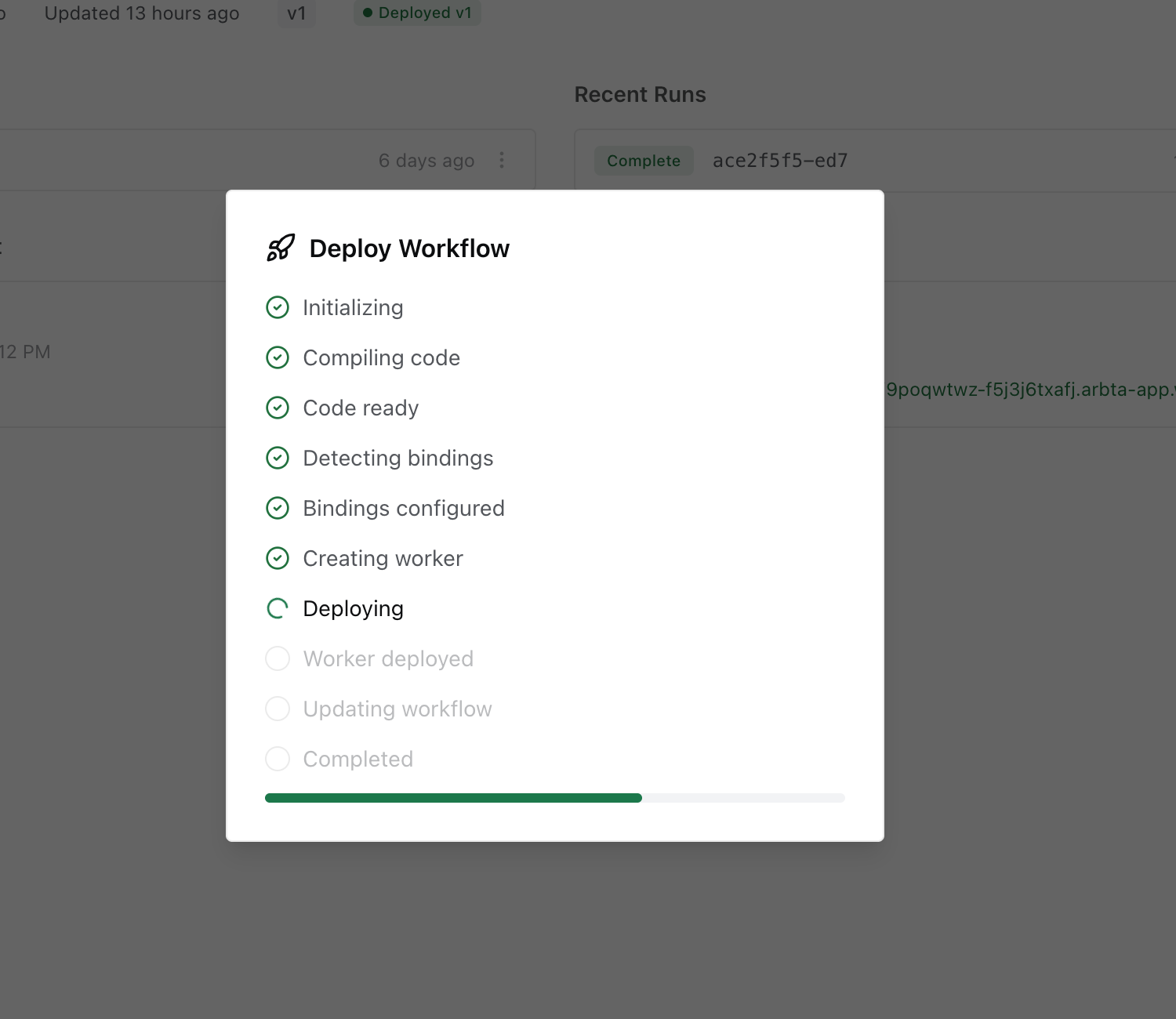
Deploy Stages
| Stage | Progress | What Happens |
|---|---|---|
INITIALIZING | 5% | Credentials are validated, workflow IR is fetched from the database. |
GENERATING_CODE | 15% | The IR is passed to the codegen pipeline. TypeScript source is generated and then transpiled to JavaScript via the TypeScript compiler API. |
CODE_READY | 25% | Compiled JavaScript is ready. |
DETECTING_BINDINGS | 35% | The IR is scanned for required Cloudflare resource bindings (KV namespaces, D1 databases, R2 buckets, sub-workflow bindings). Missing binding IDs cause the pipeline to fail at this stage. |
BINDINGS_READY | 45% | All required bindings are resolved. |
CREATING_WORKER | 55% | A temporary deploy directory is created. worker.js and wrangler.json are written. If the workflow has npm dependencies, package.json is written and npm install is run. |
DEPLOYING | 65% | wrangler deploy is called. This uploads the worker to Cloudflare. After deploy, secrets are uploaded via wrangler secret put. |
WORKER_DEPLOYED | 80% | The Cloudflare Worker is live. |
UPDATING_WORKFLOW | 90% | The deployment record in the AwaitStep database is updated with the new worker name, URL, and deployment timestamp. |
COMPLETED | 100% | Deploy finished. The workflow URL is returned. |
FAILED | — | Any stage can fail. The error message from that stage is reported. The deploy is rolled back automatically (temp files cleaned up). |
Automatic Binding Detection
AwaitStep automatically detects which Cloudflare resources your workflow needs:
- KV namespaces — any
stepnode code that referencesenv.MY_KVwill add a KV binding namedMY_KV. - D1 databases — references to
env.MY_DBadd a D1 binding. - R2 buckets — references to
env.MY_BUCKETadd an R2 binding. - Sub-workflow bindings — every
sub_workflownode adds a Workflow binding for the child workflow.
For KV and D1 bindings, AwaitStep needs the resource ID to generate the wrangler.json. You must provide these via environment variables in the Environment panel:
MY_KV_BINDING_ID=<your-kv-namespace-id>
MY_DB_BINDING_ID=<your-d1-database-id>
If a required binding ID is missing, the deploy will fail at the DETECTING_BINDINGS stage with a clear error message.
SSE Stream
The deploy endpoint streams progress using Server-Sent Events. Each event is a JSON object matching the DeployProgress type:
interface DeployProgress {
  stage: DeployStage
  message: string
  progress: number // 0–100
}
Example SSE stream:
data: {"stage":"INITIALIZING","message":"Preparing deployment...","progress":5}

data: {"stage":"GENERATING_CODE","message":"Transpiling TypeScript...","progress":15}

data: {"stage":"CODE_READY","message":"Code compiled","progress":25}

data: {"stage":"DETECTING_BINDINGS","message":"Analyzing workflow bindings...","progress":35}

data: {"stage":"BINDINGS_READY","message":"Bindings configured","progress":45}

data: {"stage":"CREATING_WORKER","message":"Creating Cloudflare Worker...","progress":55}

data: {"stage":"DEPLOYING","message":"Deploying to Cloudflare...","progress":65}

data: {"stage":"WORKER_DEPLOYED","message":"Worker deployed","progress":80}

data: {"stage":"UPDATING_WORKFLOW","message":"Updating workflow configuration...","progress":90}

data: {"stage":"COMPLETED","message":"Deployment successful","progress":100}
What Gets Deployed
The deploy produces a single Cloudflare Worker:
- Worker name — derived from the workflow ID:
awaitstep-<workflowId> - Worker URL —
https://awaitstep-<workflowId>.<accountSubdomain>.workers.dev - Custom route — if configured, the worker is also reachable at your own domain (e.g.
api.example.com/my-workflow/*). See Custom Routes. - Dashboard URL — link to the Cloudflare dashboard for the deployed worker
The worker exports a WorkflowEntrypoint class and, if an HTTP trigger is configured, a fetch handler.
Custom Routes
By default, workflows are only reachable at their *.workers.dev URL. You can attach a custom route so the workflow is served from your own domain (e.g. api.example.com/process-order/*).
When a route is configured, AwaitStep adds a routes entry to the generated wrangler.json:
{
  "routes": [
    {
      "pattern": "api.example.com/process-order/*",
      "zone_name": "example.com"
    }
  ]
}
Routes require a proxied DNS record on the hostname. If one doesn't exist, create a proxied AAAA record pointing to 100:: (the IPv6 discard prefix). Without this record, requests will fail with DNS_PROBE_FINISHED_NXDOMAIN.
| Type | Name | Content | Proxy status |
|---|---|---|---|
| AAAA | api | 100:: | Proxied |
See Custom Routes for full setup instructions.
Re-deploying
Every deploy is a full replacement. The existing worker is overwritten by wrangler deploy. Secrets that were previously set and are not present in the new deploy are not automatically removed — they persist in the Cloudflare secret store.
Deploy Failures
If the deploy fails, the error is shown in the UI with the stage that failed. Common failure causes:
- Invalid credentials —
accountIdorapiTokenis wrong or expired. - Missing binding ID — a KV or D1 binding ID environment variable is not set.
- Compile error — the generated TypeScript has a type error (rare; usually caused by malformed expressions).
- Wrangler timeout — the deploy took longer than 2 minutes (network or Cloudflare API issue).